The Cord Screen
What it is
The Cord screen is where you thread runes into spells. It explains each spell in plain words, with its exact cost and cooldown, before you ever cast it.
How to get it
Press K (change it in Controls). The screen doesn’t pause the game.
Without a Cord, the screen says “You aren’t wearing a Cord” and where the slot is. The Aura badge still works, and if you’ve copied the Relay Circle lesson you can still read it from here.
How to use it
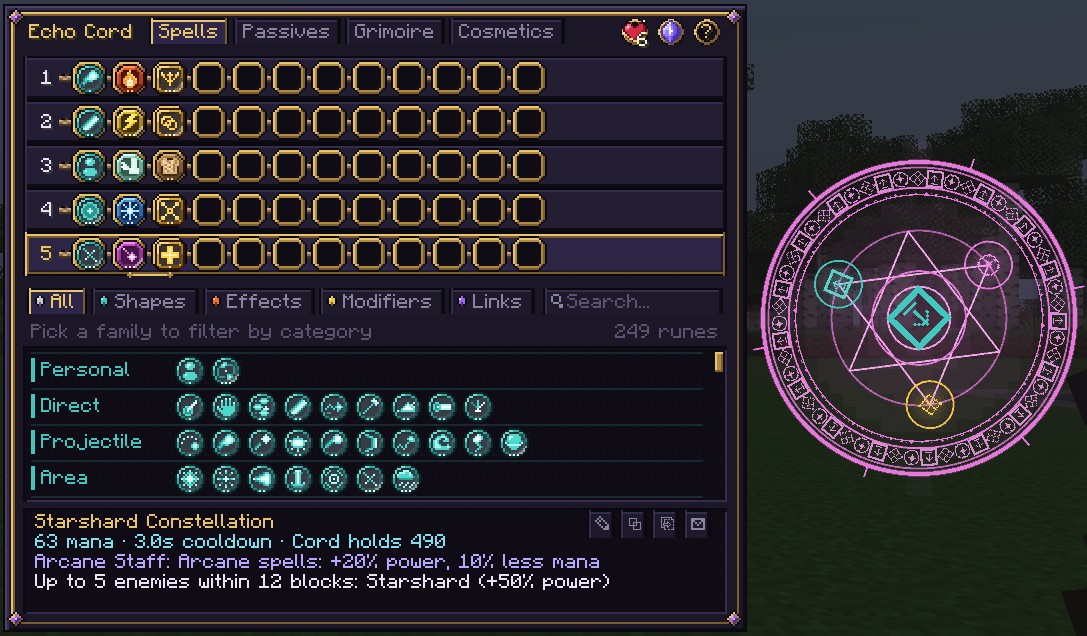
From top to bottom:
- The header: your Cord’s name, the page tabs (Spells, Passives, Grimoire, Cosmetics) and the badges.
- The spell rows: one row per spell, with a socket for each rune and a rank badge at the end.
- Family tabs and search: All, Shapes, Effects, Modifiers, Links, the search box and the loadouts badge.
- Category chips for the chosen family.
- The Codex: every rune you know.
- The readout: the selected spell explained, with four tool buttons.
When there’s room, the selected spell’s magic circle is drawn beside the window. It redraws ring by ring each time you change the spell, which is a good way to learn to read circles.
The badges
| Badge | Shows | Hover or click |
|---|---|---|
| Aura (a blade) | Your sword side. | Click to open the Aura screen and your Master forms. |
| Shield | A dot while your spellguard recharges. | How much less spells hurt you, and why. See Defending Against Magic. |
| Heart | Your Heart Circle count. A gold light blinks when the next circle is ready. | What your circles give and what the next one still needs. See Heart Circles. |
| Mana | Where your max mana and regeneration come from. See Mana. | |
| ? | Which keys cast, switch and open the screen. |
Threading runes
| To | Do this |
|---|---|
| Add a rune to the end of the selected spell | Click it in the Codex |
| Put a rune in a set place | Drag it onto a socket |
| Move a rune | Drag it along the row, or onto another row |
| Take a rune off | Click it, or drag it off the Cord |
| Pick the spell to edit and cast | Click its row |
Every change is saved at once. A change that isn’t allowed plays a low note and shows why at the top of the readout, for example “Fire is too strong for this Cord: it needs a Copper Cord”.
- Gold lines under the sockets join each modifier to the rune it changes. A red mark means it has nothing to change. See How modifiers find their rune.
- A rune with a red corner is quiet: kept, but it won’t fire.
- A just-learned rune shows a ? and a hint instead of its full text. See Reading runes.
Finding runes
Runes are grouped by family and category. A rune your Cord can’t fire is dimmed with a lock.
| Family | Categories |
|---|---|
| Shapes | Personal, Direct, Projectile, Area, Lingering, Field, Kin |
| Effects | Damage, Control, Support, Movement, Time, World, Summon, Innate, Woven fusions |
| Modifiers | Power, Area, Timing, Projectile, Circle disciplines, Gathering, Tending |
| Links | Timing, Trigger, Reactive, Condition |
| Knots | Your own Knots |
Just start typing to search (or press Ctrl+F). A search matches a rune’s name, element, category,
family or tier (“tier3”). Several words must all match. Words of five letters or more also match descriptions.
Ctrl+Backspace or right-click clears the search, and Esc clears it, then leaves the box, then closes the
screen. Searches are capped at 40 characters.
For a bigger view, click Catalog at the right end of the filter row (or press Ctrl+B) to open the
Rune Catalog. It filters runes by family, element and use and
shows what goes well with each one. The Catalog link can’t be clicked on the Grimoire page, but Ctrl+B still works.
The readout
The readout explains the selected spell, line by line:
- The name: automatic, yours, or a found secret spell’s true name.
- The price: mana, cooldown and your Cord’s mana (“64 mana · 3.2s cooldown · Cord holds 225”), with all your discounts counted. It turns red if the spell costs more than your whole pool.
- Mastery: the spell’s rank and progress. See Spell Mastery.
- Gear and affinity that change the spell.
- What it does: one line per group, with a header after each link (“On hit:”, “After 1s:”).
- Warnings in yellow, each starting with !.
A lesson spell missing a part says “Unfinished” and the lesson’s name, and can’t be cast.
| Common warning | Fix |
|---|---|
| Amplify does nothing here: nothing on its left that it can change. | Move the modifier right of the rune you meant. |
| Bolt has no effect after it. | Add an effect after the shape. |
| On Hit needs a shape before it to watch. | On Hit, On Kill, On Reaction, On Weakness and Imbue need a shape before them. |
| Only 3 Echoes count; the rest are ignored. | Remove the extra Echo. |
| Costs more than this Cord’s 100 mana, so it can’t be cast. | Trim the spell or grow your mana. |
The full rules are on How a Spell Is Read.
The spell tools
Four buttons sit at the top right of the readout.
- Rename: type a name (up to 28 characters) and press
Enter. Save an empty name to go back to the automatic one. Your name is yours alone: a shared code carries only the runes. - Copy spell code: copies a short code such as
wc:bolt.fire.split.on_hit.burst.explode. Paste it in chat and everyone sees a spell card they can hover and click. See Playing Together. - Paste spell code: loads the code on your clipboard into the selected spell. Only runes you know and your Cord can fire are loaded. Lesson spells only paste if you meet every lesson requirement.
- Inscribe a scroll: writes the spell on a Spell Scroll that anyone can cast once, Cord or not. It takes a sheet of paper, an ink sac (or glow ink sac) and twice the spell’s mana cost. Scrolls cast at plain strength. A spell of Adept rank or higher also carries its traits and sigil, so a friend can study it. Lesson spells can’t be inscribed.
Automatic names come from the first group: the first modifier becomes an adjective, the effect the
element, the shape the noun. Bolt · Fire · Split is “Splitting Fire Bolt”. A › marks the group after a
link, & a second shape and + a name too long to say in full.
The Spells page also shows how many builds you’ve saved in your spell library (“Saved spells: 3 / 24”). See Research.
Loadouts and mastery
- Click the list badge or press
Ctrl+Lto open Loadouts. - Click a row’s rank badge or press
Ctrl+Mto open the spell’s mastery panel. A gold dot means a trait is waiting to be chosen.
The Passives page
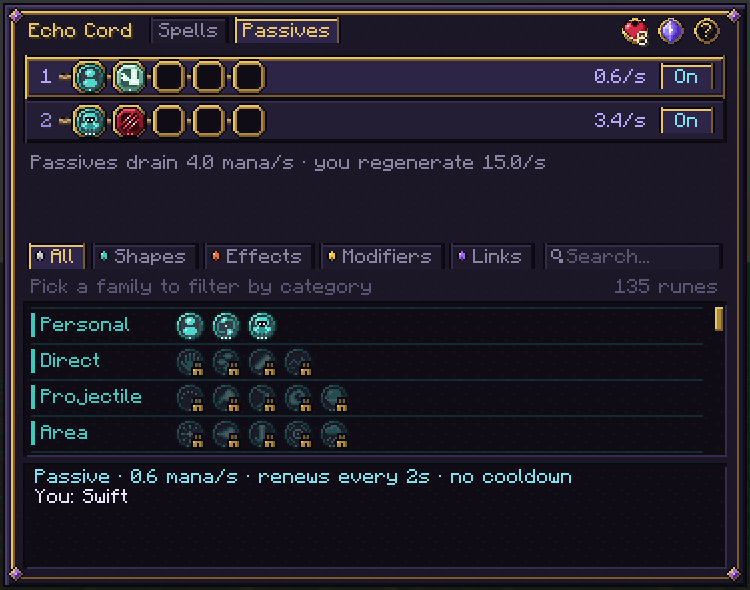
Two rows for your passive spells. The first opens at your 1st Heart Circle, the second at your 5th. Each holds 2 runes, shows its upkeep per second and has an On/Off switch. A line underneath compares your total drain with your regeneration.
The Grimoire page
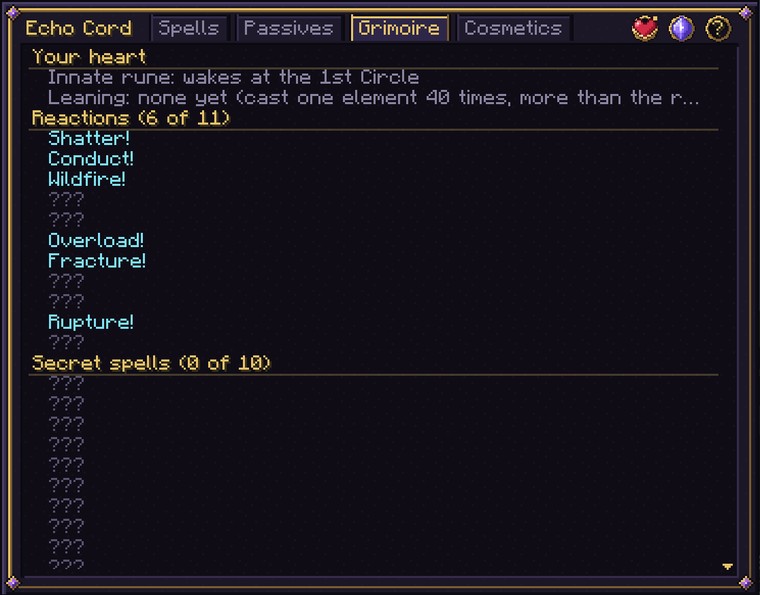
Your book of discoveries. It holds:
- Your heart: innate rune and leaning.
- Archive lessons: Relay, Reweave, Excise, Tollgate, Lifeline and Conduit, once copied. Click one to read it.
- Life journal, Aura arts and Where you stand (the elemental climate around you).
- Bestiary, Affinities and Reactions.
- Secret spells: found ones by name, riddles you’ve read, “???” for the rest.
- Duels, Fusions, Attunements and Feats.
More on The Grimoire.
The Cosmetics page
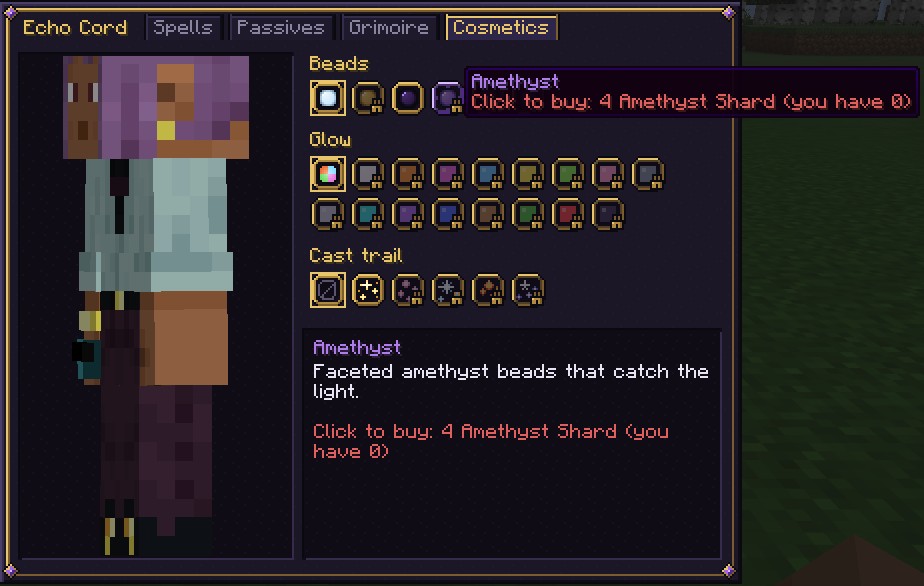
Change your Cord’s Beads, Glow and Cast trail. Point at any option, even a locked one, to preview it. See Cosmetics.
Tips and counterplay
- Watch the gold lines: they’re the quickest way to check your rune order.
- Use the magic circle beside the window to learn how each rune looks, so you can read other players’ spells.
- Quick keys:
Kopen,Ctrl+Fsearch,Ctrl+BRune Catalog,Ctrl+Lloadouts,Ctrl+Mmastery,Escback out.